Metrics reports
- Tier: Premium, Ultimate
- Offering: GitLab.com, GitLab Self-Managed, GitLab Dedicated
Metrics reports display custom metrics in merge requests to track performance, memory usage, and other measurements between branches.
Use metrics reports to:
- Monitor memory usage changes.
- Track load testing results.
- Measure code complexity.
- Compare code coverage statistics.
Metrics processing workflow
When a pipeline runs, GitLab reads metrics from the report artifact and stores them as string values
for comparison. The default filename is metrics.txt.
For a merge request, GitLab compares the metrics from the source branch to the values from a baseline pipeline on the target branch. The merge request widget displays the metrics in this order:
- Existing metrics with changed values.
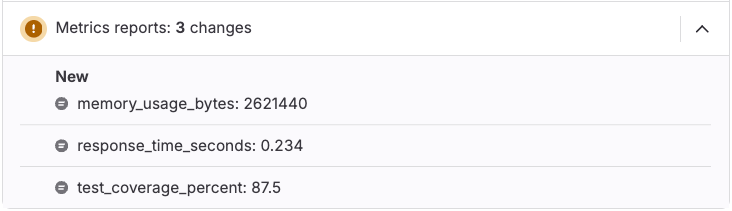
- Metrics added by the merge request (marked with a New badge).
- Metrics removed by the merge request (marked with a Removed badge).
- Existing metrics with unchanged values.
If the baseline pipeline has no metrics report artifacts, all metrics from the source branch display as new. The metrics comparison widget appears only when the source branch pipeline is in a completed state and has metrics report artifacts.
Configure metrics reports
Add metrics reports to your CI/CD pipeline to track custom metrics in merge requests.
Prerequisites:
- The metrics file must be a text file with one metric per line, in the format
<name> <value>. The OpenMetrics text format meets this requirement.
To configure metrics reports:
- In your
.gitlab-ci.ymlfile, add a job that generates a metrics report. - Add a script to the job that generates metrics, with one
<name> <value>per line. - Configure the job to upload the metrics file with
artifacts:reports:metrics.
For example:
metrics:
  stage: test
  script:
    - echo 'memory_usage_bytes 2621440' > metrics.txt
    - echo 'response_time_seconds 0.234' >> metrics.txt
    - echo 'test_coverage_percent 87.5' >> metrics.txt
    - echo '# EOF' >> metrics.txt
  artifacts:
    reports:
      metrics: metrics.txt
After the pipeline runs, the metrics reports display in the merge request widget.
For additional format specifications and examples, see Prometheus text format details.
Troubleshooting
When working with metrics reports, you might encounter the following issues.
Metrics reports did not change
You might see Metrics report scanning detected no new changes when viewing metrics reports in merge requests.
This issue occurs when:
- The target branch doesn’t have a baseline metrics report for comparison.
- Your GitLab subscription doesn’t include metrics reports (Premium or Ultimate required).
To resolve this issue:
- Verify your GitLab subscription tier includes metrics reports.
- Ensure the target branch has a pipeline with metrics reports configured. To ensure one is available, run pipelines on the target branch that produce metrics report artifacts.
- Verify that your metrics file uses valid OpenMetrics format.