GitLab Duo in merge requests
GitLab Duo is designed to provide contextually relevant information during the lifecycle of a merge request.
Generate a description by summarizing code changes
- Tier: Premium, Ultimate
- Add-on: GitLab Duo Enterprise
- Offering: GitLab.com, GitLab Self-Managed
- Status: Beta
When you create or edit a merge request, use GitLab Duo Merge Request Summary to create a merge request description.
-
In the Description field, put your cursor where you want to insert the description.
-
On the toolbar above the text area, select Summarize code changes ( ).
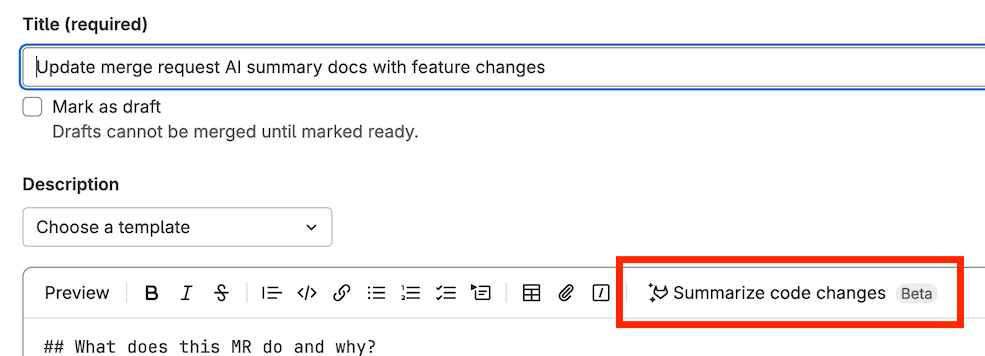
The description is inserted where your cursor was.
Provide feedback on this feature in issue 443236.
Data usage: The diff of changes between the source branch’s head and the target branch is sent to the large language model.
Use GitLab Duo to review your code
GitLab Duo can review your merge request for potential errors and provide feedback on alignment to standards.
When you request a review from @GitLabDuo, one of the following features runs:
- Code Review Flow: The new flow available through the GitLab Duo Agent Platform. Uses GitLab Credits.
- GitLab Duo Code Review (Classic): The classic code review functionality.
The review feature that runs depends on the add-on of the user that starts the GitLab Duo review:
- Manual review requests: The user who requests the review.
- Automatic reviews: The user who authors the merge request.
- Merge requests that start in draft: The user who marks the MR as ready.
Because the review feature is based on the requesting user’s add-on, both features can run in the same project.
How the review features compare
While you interact with both review features the same way, Code Review Flow offers enhanced capabilities compared to GitLab Duo Code Review (Classic):
- Improved context awareness: Better understanding of repository structure and cross-file dependencies.
- Agentic capabilities: Multi-step reasoning for more thorough analysis.
- Modern architecture: Built on the scalable GitLab Duo Agent Platform.
Both features support automatic reviews, custom instructions, and custom comments.
Summarize a code review
- Tier: Premium, Ultimate
- Add-on: GitLab Duo Enterprise
- Offering: GitLab.com, GitLab Self-Managed, GitLab Dedicated
- Status: Experiment
When you’ve completed your review of a merge request and are ready to submit your review, use GitLab Duo Code Review Summary to generate a summary of your comments.
- On the top bar, select Search or go to and find your project.
- In the left sidebar, select Code > Merge requests and find the merge request you want to review.
- When you are ready to submit your review, select Finish review.
- Select Add Summary.
The summary is displayed in the comment box. You can edit and refine the summary before you submit your review.
Provide feedback on this experimental feature in issue 408991.
Data usage: When you use this feature, the following data is sent to the large language model:
- Draft comment’s text
Generate a merge commit message
- Tier: Premium, Ultimate
- Add-on: GitLab Duo Enterprise, GitLab Duo with Amazon Q
- Offering: GitLab.com, GitLab Self-Managed, GitLab Dedicated
When preparing to merge your merge request, edit the proposed merge commit message by using GitLab Duo Merge Commit Message Generation.
- On the top bar, select Search or go to and find your project.
- In the left sidebar, select Code > Merge requests and find your merge request.
- Select the Edit commit message checkbox on the merge widget.
- Select Generate commit message.
- Review the commit message provided and choose Insert to add it to the commit.
Data usage: When you use this feature, the following data is sent to the large language model:
- Contents of the file
- The filename
Related topics
Troubleshooting
When working with GitLab Duo in Merge Requests, you might encounter the following issues.
Response not received
If you ask GitLab Duo for a review by mentioning or replying to @GitLabDuo,
and do not receive a response, this might be because you do not have the
appropriate GitLab Duo add-on.
To check your GitLab Duo add-on, ask your group Owner to check the group’s GitLab Duo seat assignments.
To change your GitLab Duo add-on, contact your administrator.
Unable to assign GitLab Duo to review
If you cannot assign GitLab Duo as a reviewer, it might be because you do not have the appropriate GitLab Duo add-on.
To check your GitLab Duo add-on, ask your group Owner to check the group’s GitLab Duo seat assignments.
To change your GitLab Duo add-on, contact your administrator.
Error: GitLab Duo Code Review was not automatically added...
If you try to create a merge request with automatic reviews from GitLab Duo turned on, you might get the following error message:
GitLab Duo Code Review was not automatically added because your account requires
GitLab Duo Enterprise. Contact your administrator to upgrade your account.
Contact your administrator to ask them to purchase a GitLab Duo Enterprise seat and assign it to you.